
Taking a Site Offline at SiteDistrict
Different options depending on what you want
If you have a website hosted with SiteDistrict, and you no longer want it to be publicly available, or you want to avoid paying for hosting it, you have a few options.
If you're actually thinking about or have decided to migrate your WordPress site to another hosting platform, then check out our page on moving a site off SiteDistrict.
Reasons
There could be several reasons why you might want to take a site offline. One or more of the following may apply:
- Switching Platforms You're switching to a proprietary platform such as SquareSpace, Wix, Shopify, or something similar.
- Save MoneyYou've decided that whatever money you're spending on hosting is better saved or spent elsewhere.
- No Longer NecessaryThe website itself is no longer needed, for whatever reason
- Shutting Down BusinessMaybe you wanted to keep the website up, but your business just didn't turn out to be successful, so it doesn't make sense to keep it any longer.
- New Domain / RedirectMaybe you've replaced your domain with a new one, either hosted on SiteDistrict, or with another service, and you want to redirect visitors to the new domain & site.
- Merged / Replacement SiteMaybe you've merged multiple sites into one, and no longer need one of the older ones.
- Restrict AccessWhile not strictly taking a site "offline", you might want to restrict who has access to the site, or what pages are available.
Picking Your Options
Which option you choose depends primarily on whether you want to keep the site around, and what you want to happen when someone enters the domain in their browser, or follow a link to the domain from a search engine or elsewhere.
Taking it Offline
On SITEDISTRICT, you have several options for taking a live site offline. These include:
- Disable the Site
- Remove the Domain
- Delete the Site
Each of these options is detailed below.
Restricted Access / Redirect
In addition, there are some options for keeping a site accessible, which means that PHP and MySQL are kept running, and you can access the WordPress admin / backend, but access to the site is restricted to the public.
See our page on Restricting Access to a Site for more details on those options.
Taking it Offline
Disabling a Site
One option for taking your site offline is to Disable it. WordPress sites are dynamic, and require two types of software to be available & running: PHP and MySQL.
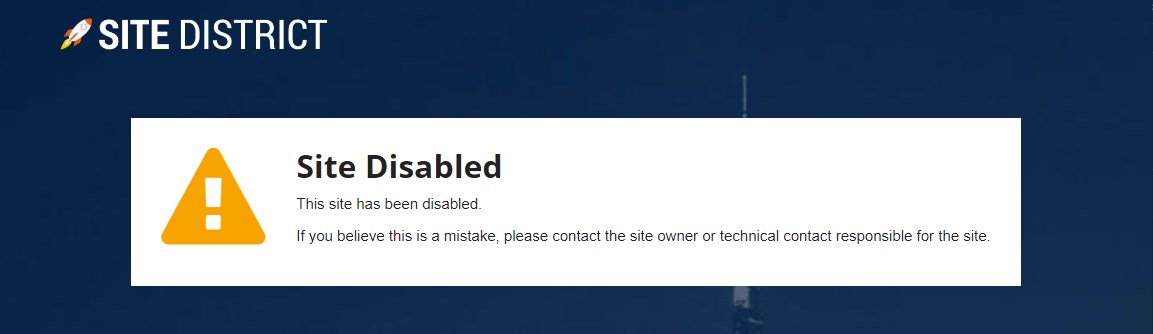
When you disable a site on SITEDISTRICT, it "turns off" both PHP and MySQL, and blocks requests to the files within the site. It also results in a Site Disabled page being shown if you try to visit the site.
You can disable the site via the site's Settings page:
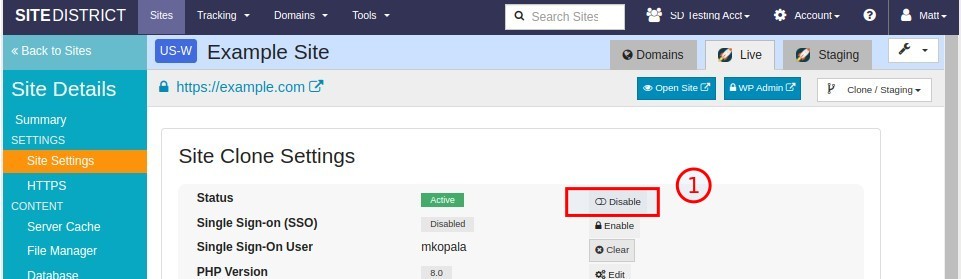
Once disabled, the default SiteDistrict Site Disabled page will be shown to visitors:
Remove the Domain
Another option for taking a site offline is to remove the live domain from the site. This can be done from the Domains tab under the Site Details view.
A domain is removed by clicking on the trash can icon in the last column:
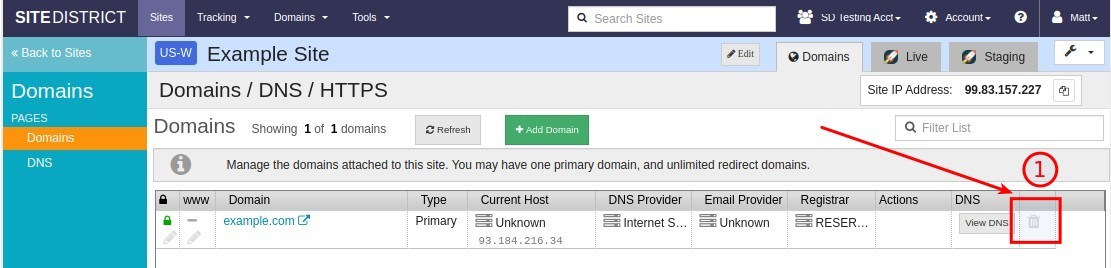
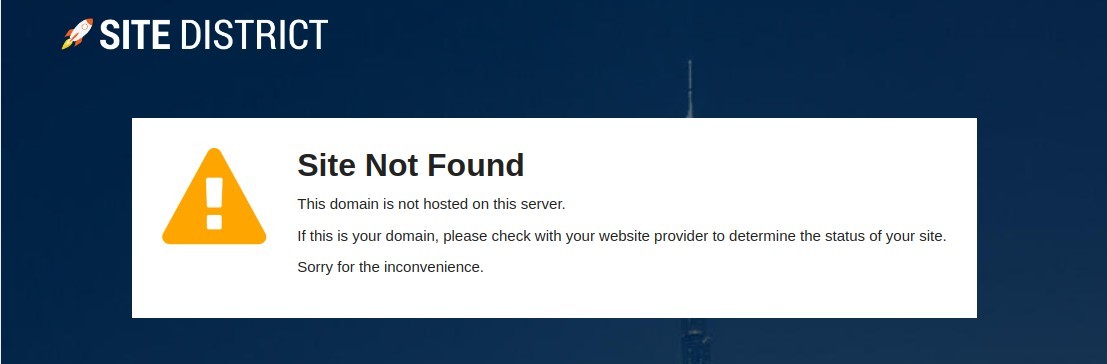
Once the domain is removed from the site, and as long as your DNS records still point the domain at SiteDistrict, visitors will see a Site Not Found page if they attempt to access the site or any pages on ths site:
Note: If you have additional Redirect domains attached to the site, they will need to be removed first.
Once a domain is removed from the site, you can still access the site via the .sitedistrict.com subdomain. However, sites that do not have a live domain attached will be Frozen after 1-2 weeks of inactivity.
When a site is Frozen, both PHP and MySQL are turned off for the site, and anyone trying to access the site will see a Site Frozen page:
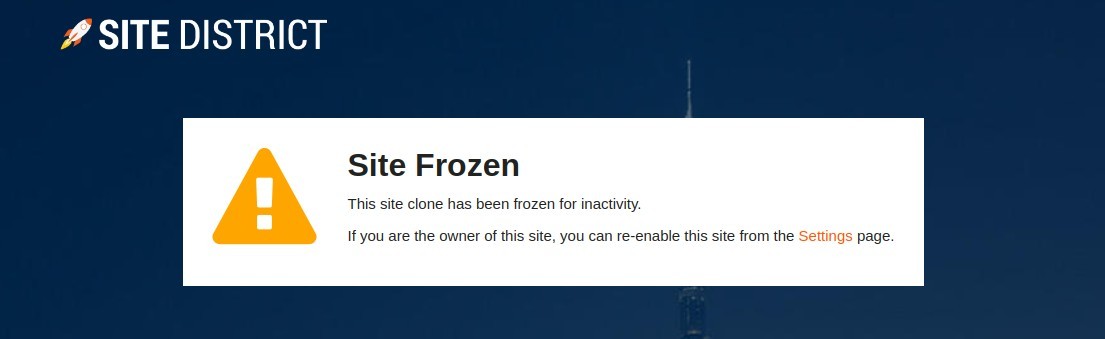
You can re-enable a frozen site clone at any time, with just a few clicks.
Delete the Site
Finally, if you are sure that you no longer want the site at all, and no longer wish to access or edit it on SITEDISTRICT, you can Delete the site.
Before you delete a site, you may wish to download a backup of the site. See the section of our Backups and Restore page on downloading a backup, for more information.
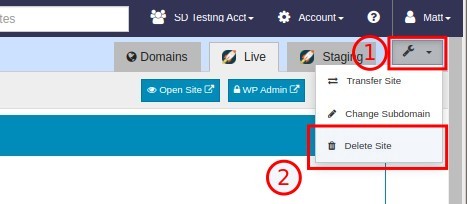
To completely delete a site, select the Delete Site option from the wrench menu at the top right of the Site Details view:
If your site is live, you will need to confirm the effects of deleting the site by checking the checkboxes in the dialog, and typing the required text as shown:
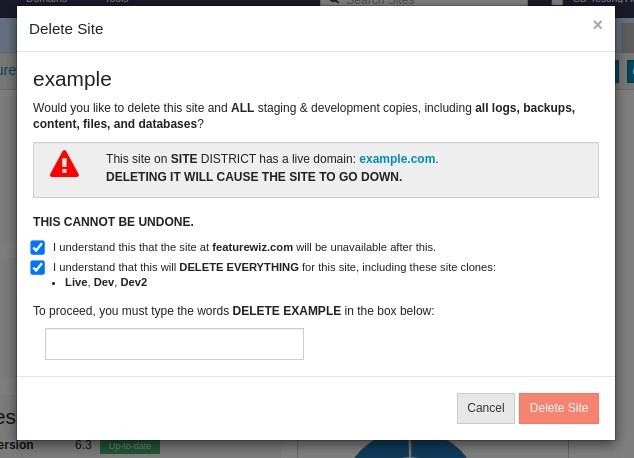
WARNING: As shown in the dialog, deleting a site will remove the entire site, all staging copies and clones, and all backups. This cannot be undone. If you're not sure about deleting your site, you may consider one of the options above, either Disabling the site, or Removing the Domain.
Billing
By taking a site offline, you reduce your Active Sites count, which can either halt billing completely after a time, or reduce your monthly hosting bill.
Active Site Count
For billing purposes, we define Active Sites as sites that have a Domain attached that is pointed at SITEDISTRICT, via DNS records.
Once a site is taken offline in one of the ways described above, your Active Sites count will drop, as found on the Usage page under the Account menu.
For example, if you had a single site, and deleted it, you might see something like this:
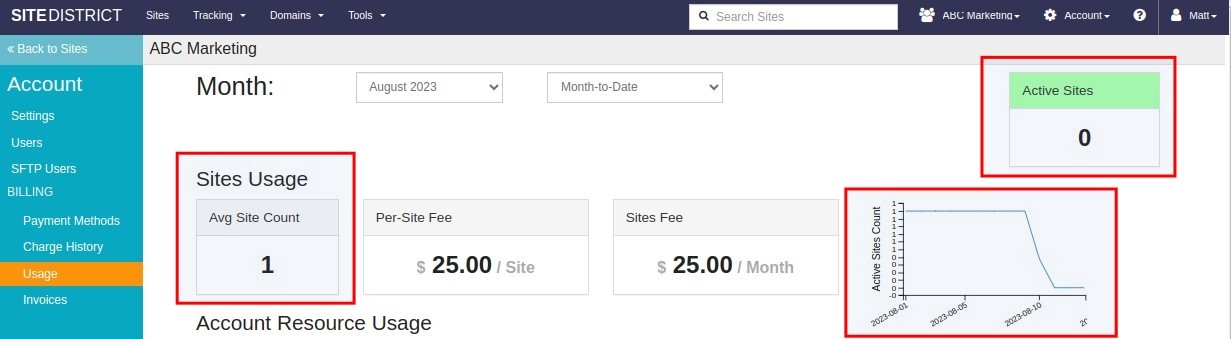
For billing purposes, the number of Active Sites for the month is based on the average number of sites that were active for the month, rounded up to the nearest whole number.
Example: If you have a single site, and you delete it on the 5th of the month, and don't create any additional sites, your average for the month will still be 1.Last Invoice
At SITEDISTRICT, we bill monthly based on the previous month's usage. This means that after you take a site offline, you will receive at least one more invoice on the 1st of the next month, covering the partial month's hosting of that site.
The Future
As our billing system is flexible and automatic, you can add and remove sites to your account at any time.
If your site count falls to zero, you will no longer receive any invoices for months when you did not have any active sites with live domains.
If you disabled your site or removed your domain, and decide to re-enable it later, you can do so easily, and you will be automatically invoiced again on the 1st of the following month.
If you wish to add more or new sites to your account, even after disabling or removing all of your live sites, the same applies.
Summary
At SITEDISTRICT you have multiple options for taking a website offline. Two of these options even allow you to retain the site on SITEDISTRICT without deleting it completely.
 Twitter
 Facebook
 Linkedin